
Back to SoWal Lounge

Computer techie question........

Dia avatar
Beach Fanatic
720 views
I'll try to explain this so it makes sense :bang:

we have a hp & use windows xp.

I have several logins for each of us in the house. Somehow my settings were played with (think 5 year old).

Example of the problem: If I click on a link from the sowal page, it opens a new window. (fine) When I close the new window - it closes the sowal page and the new link. I only want it to close the new window, not both of them.

This only happens on my login - everyone else is fine. What setting is this?

thanks

Replies

25
Minnie avatar
Beach Fanatic
#2
One way you might try to fix it, is to restore your settings back to a time before you think they were changed.
Alicia Leonard avatar
SoWal Insider
#3
One way you might try to fix it, is to restore your settings back to a time before you think they were changed.

plus go to Firefox as a browser. I use XP and use firefox as my browser. I will never use IE again if I can help it.
SoWal Insider
#4
plus go to Firefox as a browser. I use XP and use firefox as my browser. I will never use IE again if I can help it.
same here. I detest IE.
Dia avatar
Beach FanaticAuthor
#5
One way you might try to fix it, is to restore your settings back to a time before you think they were changed.

speak slowly now..............

how do I restore my settings?
Minnie avatar
Beach Fanatic
#6
by any chance do you also have Yahoo toolbar?

Edited

Dia avatar
Beach FanaticAuthor
#7
by any chance to you also have Yahoo toolbar?

no - google

but it's on all of them.
Camellia avatar
Beach Fanatic
#8
start- programs - accessories --system tools --system restore. I would be surprised if restoring to an earlier date does not take care of the problem.
ASH avatar
Beach Fanatic
#9
:popcorn:

This could take awhile. Been there, done that. :lol:
Minnie avatar
Beach Fanatic
#10
Here is a better explanation of how to get there.

Through the All Programs menu:

1.
Click Start.

2.
Point to All Programs.

3.
Point to Accessories.

4.
Point to System Tools.

5.
Click System Restore.

6.
Follow the instructions on the wizard.


Also make sure you have dumped your Internet Temporary files and history files.

Edited

bluemtnrunner avatar
Beach Fanatic
#11
Is this only an internet browser setting problem? It sounds like someone downloaded from the web and got one of those "great free make your browser better setup deals." Do the toolbars look different when your browser is open?
Running a system restore will probably fix it but you may still have to mess with your browser preferences.

Personally, I hate firefox AND I hate IE 7, I have stuck with IE 6 and life is pretty darn good.
bluemtnrunner avatar
Beach Fanatic
#12
go to control panel from the settings, then choose date, time, language and regional options (the one which have a globe and calendar drawing) Note: settings can be found on the start button menu. ;)
quote]

Curious as to what this will do to correct her problem?:idontno:
ASH avatar
Beach Fanatic
#13
Minnie is right. I have done this before. It's kinda like making your computer think the current time is three days ago including all the computer settings and programs.
Minnie avatar
Beach Fanatic
#14
go to control panel from the settings, then choose date, time, language and regional options (the one which have a globe and calendar drawing) Note: settings can be found on the start button menu. ;)
quote]

Curious as to what this will do to correct her problem?:idontno:

She can reset her control settings to a previous time, when she was not having the problem. It is also noted that many have said on Tech forums that having a Yahoo toolbar will make this happen.
bluemtnrunner avatar
Beach Fanatic
#15
She can reset her control settings to a previous time, when she was not having the problem. It is also noted that many have said on Tech forums that having a Yahoo toolbar will make this happen.


HMMM....I don't get it. The date would then be wrong on everything, right? And the application would still be installed.

You could set up a new profile and delete your old one. If you are the only one who has the issue.
ASH avatar
Beach Fanatic
#16
Nope. You get all your programs back and then at some point you turn your computer off and when you turn it back on, it remembers again what day it really is, but with the last settings.

Edited

Alicia Leonard avatar
SoWal Insider
#17
HMMM....I don't get it. The date would then be wrong on everything, right? And the application would still be installed.

You could set up a new profile and delete your old one. If you are the only one who has the issue.

Yep, or you could just turn the tool bar off as I have in the past.
Ocean Lover avatar
bean
#18
Yup, your easiest and simplest solution would be to restore. The only hang up would be if you downloaded something in the past few days that you'd want to keep, and even them you could just download it again.
bluemtnrunner avatar
Beach Fanatic
#19
Nope. You get all your programs back and then at some point you turn your computer off and when you turn it back on, it remembers again what day it really is, but with the last settings.

I don't get it and I make my living trouble shooting software, networks, servers. That doesn't make good sense. You are saying that if I setup my computer and have it all the way I want it, and then I notice my calendar is three days ahead. Putting that back on the correct date will undo all of the settings without giving me any kind of a notice that settings will be changed?
What settings, exactly does this effect?

Not to mention that a system restore goes out and uninstalls programs. The uninstall prevents orphan files and apps and keeps everything running properly.
Ocean Lover avatar
bean
#20
I don't get it and I make my living trouble shooting software, networks, servers. That doesn't make good sense. You are saying that if I setup my computer and have it all the way I want it, and then I notice my calendar is three days ahead. Putting that back on the correct date will undo all of the settings without giving me any kind of a notice that settings will be changed?
What settings, exactly does this effect?

Not to mention that a system restore goes out and uninstalls programs. The uninstall prevents orphan files and apps and keeps everything running properly.

I think you know too much!:lolabove: I do not question the little guy inside that runs my computer.;-) All I know is it works and the dates are the same.
ASH avatar
Beach Fanatic
#21
I just know it works. Done it twice to my puter in the past two years with no ill effects.
Dia avatar
Beach FanaticAuthor
#22
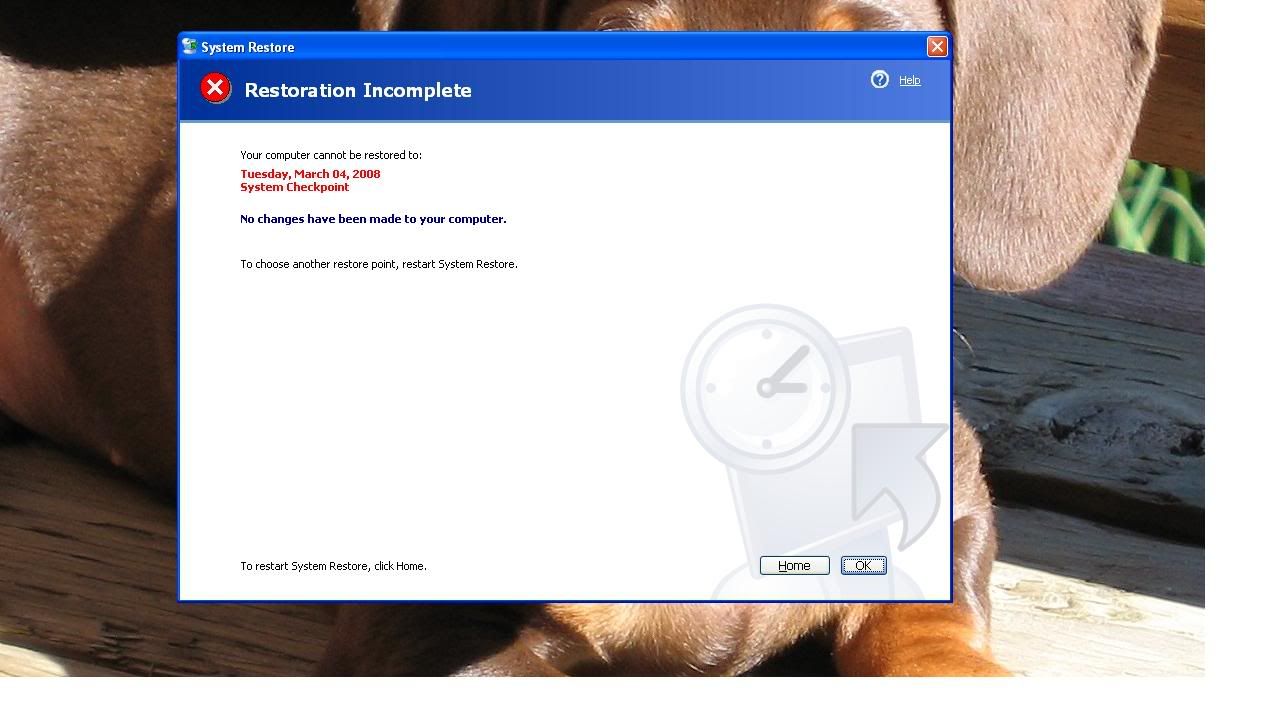
ok, I tried the system download thing & got error messages the 6 times I tried to do it (different dates each time)

error message:


next after Minnie's yahoo idea - I disconnected the Google toolbar & the paypal toolbar. The problem went away. Why? I have Google toolbar on the other logins & this problem doesn't happen.............
Minnie avatar
Beach Fanatic
#23
I have no idea why things don't work sometimes, my expertise does not go that far and according to Tech friends they really don't know either. :floor:

With computers it seems, its all trial and error and if you get something to work you leave it alone. :D
Alicia Leonard avatar
SoWal Insider
#24
Even if you turn them off they may come back up when you do a restart. I would advise to uninstall them if you don't have to have them. Too much stuff slows everything down. And I stick with my suggestion for Firefox. It is the most hassle free browser I have ever used. My browser crashed daily with IE, no matter what I did. Now I might get a hangup once every couple of weeks if I have 5 million windows open:biggrin::wave:

Tru Dat on Minnie. I learned the hard way by having to work through these things:clap: Happy Surfing CL2F.
Will B avatar
Moderator
#25
Google and Yahoo toolbars are the Devil's tools. Uninstall them. All the do is run in the background and use memory that could best be used by another program...
Bob avatar
SoWal Insider
#26
use firefox....download their adobe plugins.....life will be simple, and evildoers will go on screwing with internet exporer users. don't use those toolbars!

Checking your forum account

Please wait while we verify your forum account.